EARN 120% BITCOIN IN JUST 60 DAYS

Showing posts with label SERIAL KEY FOR SOFTWARE. Show all posts

How To: Find And Update Missing Windows Drivers Automatically


Finding the hardware drivers of your windows PC might become very time consuming if you are trying to find it manually. Especially when you are working with freshly installed OS on an assembled computer. There are many softwares which provides automatic installation of newest hardware drivers, But most of them are paid software and many of us can't afford it.

How To Find Missing Drivers For Free
 DriverIdentifier is a free software which helps us to find missing drivers and driver updates for our windows system. The software scans our computer for all installed hardwares and generates a web page with all our driver updates listed.

Follow my step by step guide:


  • Visit Driver Identifier website and download the software.
  • Install and run the DI software.
  • After opening the software, Click 'Scan Drivers'.
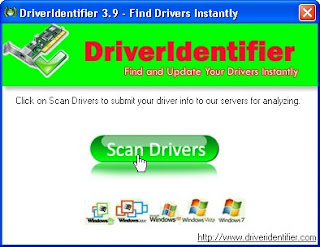
    free driver updater
  • The software will start to scan for installed hardware and finding updates. (You need an active internet connection)
  • A new webpage will open with all your driver updates listed.
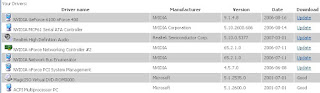
    download driver updater
  • Click on the drivers you want to install or update.
  • Done.


Change windows 7 logon screen


Registry Trick

To change the logon screen manually follow these steps:


1.Fire up registry editor (Win Key + R and then type regedit, hit enter)
2. browse in the sequence
HKEY_LOCAL_MACHINE-->software-->Microsoft-->Windows-->currentversion-->Authentication-->LogonUI-->Background
3.double click on key named OEMBackground and change its value to 1..if you dont find any key of such name..then right click on the menu and select new-->dword value32 bit key-->rename it to OEMBackground and set the value to 1


4.You just enabled the OEM Background functionality. Now browse to the folder
C:-->windows-->system32-->oobe-->info-->backgrounds
if u dont find any folder already dere then make a folder of respective name


5.Now put in any JPG file with size less than 256 kb in this folder and rename it to backgroundDefault.jpg. This file will be stretched to fit the screen, so you would want it to match the resolution of your screen so that image doesn’t look bad. You can something like smush.it or Photoshop’s Save as/Save for Web feature to reduce image size.

Using Tools

Check out Logon Changer from Tweaks.com, that lets you choose a image file to use as your logon background. That all what you do, just choose an image and Logon Changer will take care of everything else including the file size limit. It also makes it super easy to revert back to the default Logon Screen.
TRY AT YOUR OWN RISK....!!!!


Shutdown windows xp fast | speed up windows Xp shutdown


How to shutdown window xp faster 
When you shut down Windows XP, the OS tries its best to make sure that all services (they help run things like graphics, printers etc) are shut down. But there are times when they don't close, thus Windows XP tries to give it the chance to shut down itself. This amount of time that windows waits for the service to close is stored in the system registry. If you modify this setting, then windows will shut down the service earlier. To modify the setting, follow the directions below:


Then as under

1) Start – Run – Regedit
Navigate to the following Registry key:
HKEY CURRENT USER\Control Panel\Desktop
* Double click on the AutoEndTasks entry and replace the 0 with a 1 in the Value data text box
For the next two, if the dword value indicated does not exist, create it:
* Double click on the WaitToKillAppTimeout entry in the right pane and change the Value data to 2000
* Double click on the HungAppTimeout entry in the right pane and change the Value data to 1000
Reboot
* If still having a problem, make the next change:

2) HKEY_LOCAL_MACHINE\SYSTEM\CurrentControlSet\Control
* Right-click on WaitToKillServiceTimeout and change it to 2000
NOTE :- The lowest value Windows will recognize is 1000 (1 second)More Tricks and Hacks ..
    Now reboot or restart your computer, You will be able to shutdown your window xp faster. 
    TRY AT YOUR OWN RISK...THIS ONLY EDUCATIONAL PURPOSE !!!!!

100+ run commands in Windows | 100 Shortcut commands for different function

How to use these commands?
1. firstly,click to start button .
2. Then, Select run from there, here you can enter these 100+ commands to open different tools fastly .


The lists of commands are as follows -:


  • Accessibility Options : access.cpl
  • Add Hardware: hdwwiz.cpl
  • Add / Remove Programs: appwiz.cpl
  • Administrative Tools : control admintools
  • Automatic Updates: wuaucpl.cpl
  • Wizard file transfer Bluethooth: fsquirt
  • Calculator: calc
  • Certificate Manager: certmgr.msc
  • Character: charmap
  • Checking disk : chkdsk
  • Manager of the album (clipboard) : clipbrd
  • Command Prompt : cmd
  • Service components (DCOM) : dcomcnfg
  • Computer Management : compmgmt.msc
  • DDE active sharing : ddeshare
  • Device Manager : devmgmt.msc
  • DirectX Control Panel (if installed) : directx.cpl
  • DirectX Diagnostic Utility : dxdiag
  • Disk Cleanup : cleanmgr
  • System Information=dxdiag
  • Disk Defragmenter : dfrg.msc
  • Disk Management : diskmgmt.msc
  • Partition manager : diskpart
  • Display Properties : control desktop
  • Properties of the display (2) : desk.cpl
  • Properties display (tab "appearance") : control color
  • Dr. Watson: drwtsn32
  • Manager vĂ©rirficateur drivers : check
  • Event Viewer : Eventvwr.msc
  • Verification of signatures of files: sigverif
  • Findfast (if present) : findfast.cpl
  • Folder Options : control folders
  • Fonts (fonts) : control fonts
  • Fonts folder windows : fonts
  • Free Cell ...: freecell
  • Game Controllers : Joy.cpl
  • Group Policy (XP Pro) : gpedit.msc
  • Hearts (card game) : mshearts
  • IExpress (file generator. Cab) : IExpress
  • Indexing Service (if not disabled) : ciadv.msc
  • Internet Properties : inetcpl.cpl
  • IPConfig (display configuration): ipconfig / all
  • IPConfig (displays the contents of the DNS cache): ipconfig / displaydns
  • IPConfig (erases the contents of the DNS cache): ipconfig / flushdns
  • IPConfig (IP configuration cancels maps): ipconfig / release
  • IPConfig (renew IP configuration maps) : ipconfig / renew
  • Java Control Panel (if present) : jpicpl32.cpl
  • Java Control Panel (if present) : javaws
  • Keyboard Properties: control keyboard
  • Local Security Settings : secpol.msc
  • Local Users and Groups: lusrmgr.msc
  • Logout: logoff
  • Microsoft Chat : winchat
  • Minesweeper (game): winmine
  • Properties of the mouse: control mouse
  • Properties of the mouse (2): main.cpl
  • Network Connections : control NetConnect
  • Network Connections (2): ncpa.cpl
  • Network configuration wizard: netsetup.cpl
  • Notepad : notepad
  • NView Desktop Manager (if installed): nvtuicpl.cpl
  • Manager links: packager
  • Data Source Administrator ODBC: odbccp32.cpl
  • Screen Keyboard: OSK
  • AC3 Filter (if installed) : ac3filter.cpl
  • Password manager (if present): Password.cpl
  • Monitor performance : perfmon.msc
  • Monitor performance (2): perfmon
  • Dialing Properties (phone): telephon.cpl
  • Power Options : powercfg.cpl
  • Printers and Faxes : control printers
  • Private Character Editor : eudcedit
  • Quicktime (if installed) : QuickTime.cpl
  • Regional and Language Options: intl.cpl
  • Editor of the registry : regedit
  • Remote desktop connection : mstsc
  • Removable Storage: ntmsmgr.msc
  • requests the operator to removable storage: ntmsoprq.msc
  • RSoP (traduction. ..) (XP Pro): rsop.msc
  • Scanners and Cameras : sticpl.cpl
  • Scheduled Tasks : control schedtasks
  • Security Center : wscui.cpl
  • Console management services: services.msc
  • shared folders : fsmgmt.msc
  • Turn off windows : shutdown
  • Sounds and Audio Devices : mmsys.cpl
  • Spider (card game): spider
  • Client Network Utility SQL server : cliconfg
  • System Configuration Editor : sysedit
  • System Configuration Utility : msconfig
  • System File Checker (SFC =) (Scan Now) : sfc / scannow
  • SFC (Scan next startup): sfc / scanonce
  • SFC (Scan each dĂ©marraget) : sfc / scanboot
  • SFC (back to default settings): sfc / revert
  • SFC (purge cache files): sfc / purgecache
  • SFC (define size CAHC x) : sfc / cachesize = x
  • System Properties : sysdm.cpl
  • Task Manager : taskmgr
  • Telnet client : telnet
  • User Accounts : nusrmgr.cpl
  • Utility Manager (Magnifier, etc) : utilman
  • Windows firewall (XP SP2) : firewall.cpl
  • Microsoft Magnifier: magnify
  • Windows Management Infrastructure: wmimgmt.msc
  • Protection of the accounts database: syskey
  • Windows update: wupdmgr
  • Introducing Windows XP (if not erased) : tourstart
  • Wordpad : write
  • Date and Time Properties : timedate.cpl


Kaspersky Internet Security 2013 13.0.0.3082 Including Activation Free Download Full Version


Kaspersky Internet Security 2013 13.0.0.3082 Including Activation | 159 MB

Internet security solutions usually bear a richer plethora of layers of protection than traditional antivirus software, by attaching antispam, antispyware, privacy protection and parental control modules to the regular antivirus engine.This kind of computer protection guarantees a click-happy experience, away from threats that may arise from the Internet, email attachments, USB drives, corrupted files or unsecured wireless connections.

Kaspersky Internet Security doesn t fall short of these features, boasting all the capabilities you need to stay on the safe side all the time. While delivering state of the art protection from viruses and Trojans, the suite also encases protection technologies against online threats and phishing attacks, shielding your identity from malicious websites. Its cloud-based engine allows it to gather information on the latest threats, thus making sure that your computer is equipped with the appropriate defense against cyber malware.

The installation process takes a while and in order to be able to run the application properly, a restart may be required in some cases. The first encounter with the application s interface is pleasant, it has a clean look and an organized control panel that can be located in the lower area of the GUI. This is actually the section that incorporates all the protection modules, namely: a Scanning component, Parental Control, Safe Run for applications, Safe Run for Websites, Network Monitor, Applications Activity and Quarantine.

The suite can run four different scan types: a Full Scan (thoroughly analyzes all the files on all of the disks), a Critical Areas Scan (analyzes objects that are loaded at system startup or added by user), a Vulnerability Scan (detects and removes security vulnerabilities) and a Custom Scan mode that allows you to manually select the locations to be analyzed. The scanning speed is decent and a successful scanning process returns a detailed report on the threats that have been encountered, together with the recommended actions.

The Parental Control feature enables you to manage the amount of time your children spend on the computer and to control their communication habits when using Instant Messaging applications via a set of predefined rules.

With the aid of the Safe Run modules, you may launch applications or websites in a virtual and insolated environment. The firewall includes VPN and Wi-Fi connections protection plus an intrusion prevention system against hacker attacks.

The Tools section includes a Rescue Disk feature (allows you to create a bootable CD that contains tools for detecting malware), a Privacy Cleaner (removes browser history, cache and logs), a Windows troubleshooting component (detects damaged settings caused by malware) and a Browser Configuration feature (analyzes Internet Explorer settings from security viewpoint) .

Overall, Kaspersky Internet Security is an excellent choice for users that have a rich Internet activity. On top of a decent antivirus engine, it sports a collection of protection tools that targets online malware and phishing, parental control and application virtualization.

Here are some key features of "Kaspersky Internet Security":
Essential Protection:
Protects from viruses, Trojans and worms
Blocks spyware and adware
Scans files in real time (on access) and on demand
Scans email messages (regardless of email client)
Scans Internet traffic (regardless of browser)
Protects instant messengers (ICQ, MSN)
Provides proactive protection from unknown threats
Scans Java and Visual Basic scripts

Extended Protection:
Two-way personal firewall
Safe Wi-Fi and VPN connections
Intrusion prevention system
Intelligent application management and control
automatically configured application rules
security rating is assigned to unknown applications
access to the user s resources and data is restricted for unknown applications

Preventive Protection:
Scans operating system and installed applications for vulnerabilities
Analyzes and closes Internet Explorer vulnerabilities
Disables links to malware sites
Detects viruses based on the packers used to compress code
Global threat monitoring (Kaspersky Security Network)

Advanced Protection & Recovery:
The program can be installed on infected computers
Self-protection from being disabled or stopped
Restores correct system settings after removing malicious software
Tools for creating a rescue disk

Data & Identity Theft Protection:
Disables links to fake (phishing) websites
Blocks all types of keyloggers
Virtual keyboard is provided for safely entering logins and passwords
Prevents the theft of data exchanged via secure connections (HTTPS / SSL)
Blocks unauthorized dial-up connections
Cleans up any traces of user activity (deletes temporary files, cookies etc.)

Content Filtering:
Parental control
Improved antispam protection (plugins for Microsoft Outlook, Microsoft Outlook Express, The Bat!, Thunderbird)
Blocks banners on web pages

Usability:
Automatic configuration during installation
Wizards for common tasks
Visual reports with charts and diagrams
Alerts provide all the information necessary for informed user decisions
Automatic or interactive mode
Round-the-clock technical support
Automatic database updates

Requirements:
Intel Pentium 300 MHz or higher (or equivalent)
256 MB available RAM
50 MB free space on the hard drive
CD-ROM (for installation of the program from CD)
computer mouse
Internet connection (for product activation)
Microsoft Internet Explorer 5.5 or higher (for downloading updates)
Microsoft Windows Installer 2.0

What's New in This Release:
New in protection:
The Sandbox technology, which uses virtualization methods to create a safe environment for running applications (Safe Run for Applications), has been significantly improved. The application now features the option to run suspicious applications on a dedicated virtual desktop, which ensures reliable protection of the operating system. Safe Run for Websites (safe browser), which protects data being entered by the user, has been implemented to allow handling websites that require entering confidential information.
The scope of the Web Anti-Virus component has been expanded thanks to the new modules that had been added:
Online Banking identifies banking websites and allows the user to switch to Safe Run for Websites, which has been designed to handle this sort of web resources.
Safe Surf consists of previously implemented Kaspersky URL Advisor enhanced with a new mode of blocking websites with high threat rating calculated by Kaspersky Lab. When this mode is enab...


Download :-
SERVER 1 

OR

SERVER 2 

Lost your mobile? Here’s how you can block it!

Have you lost your mobile or know someone who has? This article will teach you how to block your mobile, so please share and bookmark! Each mobile carries a unique IMEI i.e. International Mobile Identity No which can be used to track your mobile anywhere in the world.
This is how it works:
1. Dial *#06# from your mobile.
2. Your mobile shows a unique 15 digit.
3. Note down this no anywhere but except your mobile as this is the no which will help trace your mobile in case of a theft.
4. Once stolen you just have to mail this 15 digit IMEI no. to cop@vsnl.net
5. No need to go to police.
6. Your Mobile will be traced within next 24 hrs via a complex system of GPRS and internet.
7. You will find where your hand set is being operated even in case your no is being changed.


If u lose your mobile, send an e-mail to cop@vsnl.net with the following Info:
Your Name :
Address :
Phone Model :
Make :
Last Used No :
E-mail For Communication :
Missed Date :
IMEI No :

Pass this very important message to your friends and relative........share this post now !!!!

Top Sites To Find All The Serials You Need...


The list below gives you some really cool sites that can provide you with the cracks , serials , and keygens for any software you would ever need. We also have a list of Keygen And Patches Of 2011 which has a total of 306 keygens and patches alltogether.

1. www.keygenguru.com
2. www.keygen.in
3. www.smartserials.com
4. www.serialkey.net
5. www.zcrack.com
6. www.subserials.net
7. www.serialportal.com
8. www.supercracks.net
9. www.serialcrackz.com
10. www.serials.be
11. www.cracktop.com
12. www.cracksfm.com
13. www.cracklib.net
14. www.theserials.com
15. www.crackdb.org
 

© 2012 H@Ck tHe wOrLd - Designed by rAj | ToS | Privacy Policy | Sitemap

Join me On Facebook | Contact Us | Write For Us